Your First Array
NumPy is Python's core library for numerical computing. Its superpower is the ndarray — a fast, flexible container for grids of numbers.
While Python lists are general-purpose, NumPy arrays are optimized for math. They're faster, use less memory, and support element-wise operations out of the box.
Creating arrays
import numpy as np

a = np.array([1, 2, 3])
b = np.array([4.0, 5.0, 6.0])
Every NumPy journey starts with import numpy as np. This is the universal convention.
Why this matters
Almost every data and ML workflow eventually becomes arrays of numbers. pandas, scikit-learn, and PyTorch all lean on NumPy; understanding ndarray first is what makes those tools feel predictable instead of magical.
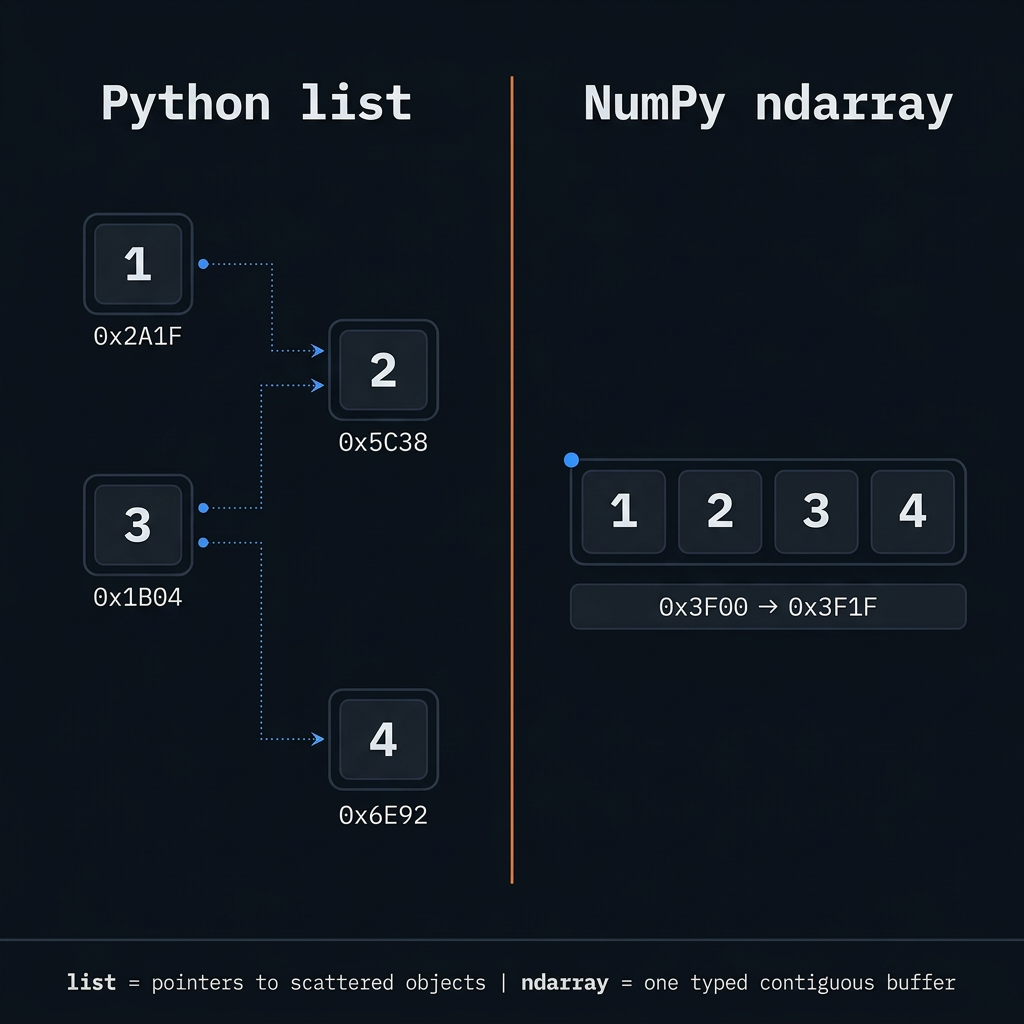
- Speed: Python
forloops are slow; NumPy pushes work into C. - Semantics:
arr * 2multiplies every element—no manual indexing.
ResourcesDocs, references & more — opens in a new tab

🎯 Your Task
Create a NumPy array called arr containing [10, 20, 30, 40, 50] and print it.
arr = np.array([10, 20, 30, 40, 50])
⌘⏎ run · ⌘← → nav
▶ Output
Run your code to see output here.